
Server console and environment status
Administrators get a quick view of service state, licensing, connected clients, logs and areas that need attention.
NDS combines the server console, management panel, Communication Studio, delivery history and security area in one locally deployed product — especially useful where fast internal communication and delivery control matter.
The page has been updated with real screenshots from the current NDS version and captions matched to the website language.
Administrators get a quick view of service state, licensing, connected clients, logs and areas that need attention.
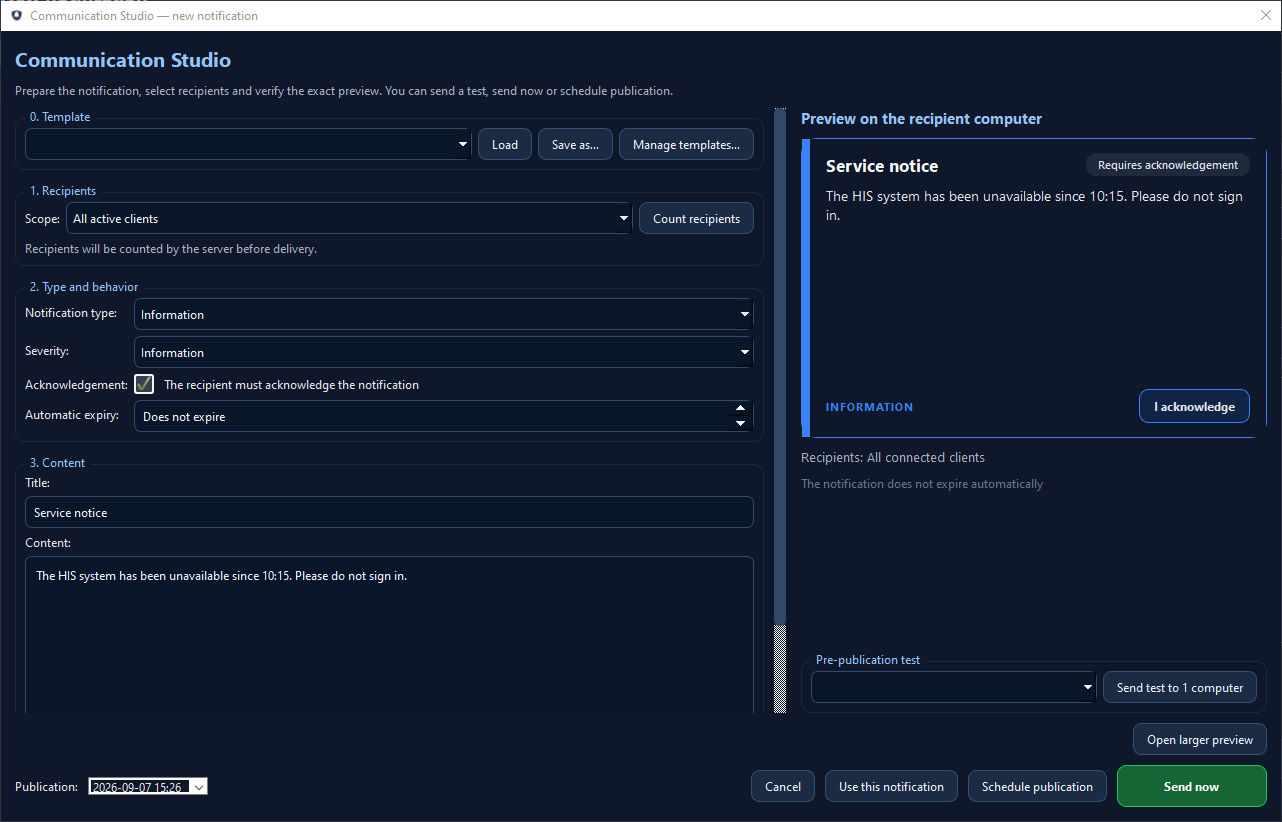
Message preparation, recipient selection, preview, pre-publication testing and sending happen in one working area.
The product combines auditability, technical support, log integrity and key security-related functions in a single console.
NDS is designed as a practical operational tool for organisations that need fast and controlled internal communication.
One screen shows service state, clients, licensing, notifications, logs and the most important operating indicators.
Create messages, select recipients, set severity, require acknowledgement and decide how or when delivery should happen.
The system records message history, reads and acknowledgements, making delivery traceable and easier to review.
Key security and service functions remain available without leaving the main management environment.
These four screens show a broader NDS picture: operator workflow, environment status, security and technical support.
Key information about clients, notifications, logs and licensing available in one operational view.
A unified view of incidents, log integrity, client state, 2FA, TLS and backup status.
Dedicated area for one-time remote assistance and review of previous support sessions.
Administrative and operational events with user, object and source information for traceable actions.
The screenshots show the English product interface used for demos. Captions match the English website version.
We can demonstrate the complete notification flow and define a safe, focused pilot scope for your organisation’s network.
NDS keeps the whole cycle in order: from message preparation to delivery, reading and historical review.
The operator defines title, content, notification type, severity and optional acknowledgement requirements.
The message can target active clients, defined groups or another selected recipient scope.
The system sends the message to clients and records delivery, read state and acknowledgement data.
Administrators can return to historical entries, logs and statistics without losing control of the process.
We deploy Notification Delivery System with the organisation’s environment in mind: local network, operating requirements, client model and the preferred way of administration and support.
Key answers before the deployment conversation.
Yes. The product is primarily designed for local deployments and controlled environments.
Yes. Message history and event tracking are core parts of the product.
Yes. NDS includes a technical support area and administrative functions helpful for keeping the environment operational.
We can demonstrate message preparation, controlled delivery, acknowledgements and security areas on a real demo environment.